
Resources exposed by the Trans.eu API are protected, which means that every request must be authorized and additionally there are API rate limits to ensure platform stability.
Authorization for the Trans.eu API is implemented using the OAuth 2.0 Authorization Framework (RFC 6749) with the Authorization Code grant type and requires:
- an active Client account on the Trans.eu Platform (an account can be created here),
- valid Client Credentials (client_id, client_secret, api-key) issued during Client Application registration.
The authorization flow is two-step one-time process and one repeatable step:
Authorization Diagram
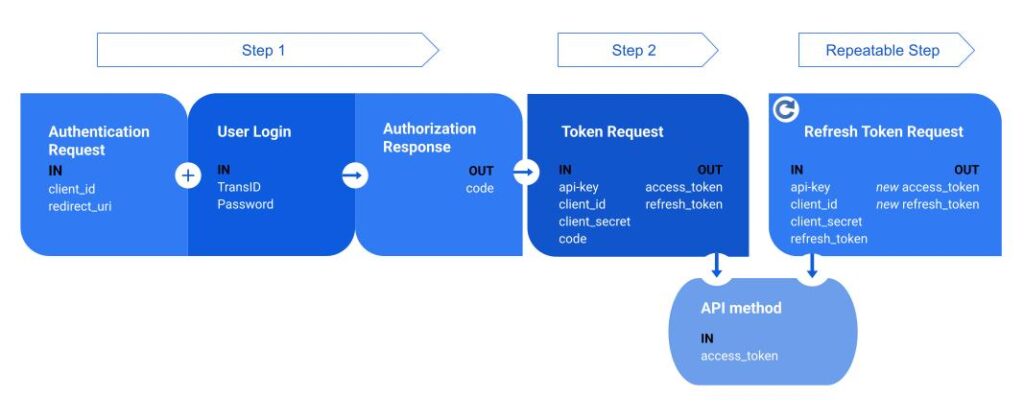
Step 1 — Authentication Request
A. Authentication Request
The Client initiates the Authorization Code flow by sending an authentication request to the Trans.eu Authorization Server.
Authentication Request
GET /oauth2/auth HTTP/1.1
Host: auth.platform.trans.eu
Request Parameters
| Parameter name | Mandatory | Description |
| client_id | required | The Client Identifier issued during client application registration. |
| response_type | required | MUST be set to code. |
| state | recommended | An opaque value used by the Client to maintain state between the request and the callback. It SHOULD be a cryptographically random string with a minimum length of 8 characters. |
| redirect_uri | required | The redirection endpoint to which the Authorization Server sends the authorization code. The value MUST exactly match one of the redirect URIs registered for the Client. |
Example Request
GET /oauth2/auth?client_id=example_app_client_id&response_type=code&state=random_number&redirect_uri=https://example.com/applicationendpoint HTTP/1.1
Host: auth.platform.trans.eu
B. User login
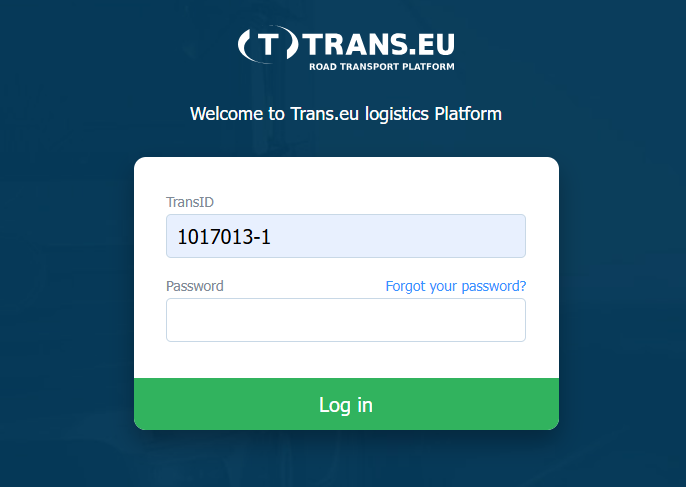
After sending the request the User provides their username and password on the Trans.eu Platform login page.
For the authorization process it is required for users to provide credentials by themselves. It is also very important to give the possibility to authorize each individual user separately.
C. Authorization Response
If the User successfully authenticates and grants access, the Authorization Server redirects the user-agent to the Client’s redirection endpoint with an authorization code.
Authorization Successful Response
The Authorization Server issues an authorization code and returns it to the Client by adding the following parameters to the redirection URI.
Response Parameters
| Parameter name | Mandatory | Description |
| code | required | The authorization code generated by the Authorization Server. The code is a short-lived, single-use value that MUST be exchanged for an access token. For security reasons code lifetime is limited to 1 minute, after that period it becomes invalid. |
| state | required if present in the request | The exact value received from the Client in the authorization request. The Client SHOULD validate this value to mitigate cross-site request forgery (CSRF) attacks. |
Example Successful Response
HTTP/1.1 302 Found
Location: https://example.com/applicationendpoint?code=authorization_code_value&state=random_number
Authorization Error Response
If the authorization request is invalid, the User denies access, or an error occurs, the Authorization Server redirects the user-agent to the Client’s redirection endpoint with an error response.
Warning: Not every error will cause a redirect. If the request fails due to a missing, invalid, or mismatching redirect URI or client id, the Trans.eu Authorization Server will notify the user on its website.
Error Parameters
| Parameter name | Mandatory | Description |
| error | required | A single ASCII error code as defined in OAuth 2.0 (e.g. access_denied, invalid_request, unauthorized_client). |
| error_description | optional | Human-readable text providing additional information about the error. |
| state | required if present in the request | The exact value received from the authorization request. |
Example Error Response
HTTP/1.1 302 Found
Location: https://example.com/applicationendpoint?error=access_denied&error_description=The+resource+owner+denied+the+request&state=random_number
Step 2 — Token Request
The Client exchanges the received authorization code for an access token by making a token request using Client Credentials. Especially Client Secret key MUST be stored securely and MUST NOT be exposed in client-side applications.
The Authorization Server responds with an access token, which MUST be included in any API requests using the Bearer Token scheme in the Authorization HTTP header:
Authorization: Bearer <access_token>Token Request
The Token Request header MUST include the API key assigned during client application registration.
Token Request
POST /ext/auth-api/accounts/token HTTP/1.1
Host: api.platform.trans.eu
Content-Type: application/x-www-form-urlencoded
Api-key: {unique_app_api-key}
Request Header & Parameters
| Header/Parameter name | Mandatory | Description |
| Content-Type (header) | required | MUST be set to application/x-www-form-urlencoded. |
| Api-key (header) | required | A unique application API key assigned during client application registration. |
| grant_type | required | MUST be set to authorization_code. |
| code | required | The authorization code received from the Authorization Response. The code is single-use and short-lived. |
| redirect_uri | required | The redirect URI used in the authorization request. The value MUST exactly match the registered redirect URI from Step 1. |
| client_id | required | The Client Identifier issued during client application registration. |
| client_secret | required | The Client Secret issued during client application registration. |
Example Request
POST /ext/auth-api/accounts/token HTTP/1.1
Host: api.platform.trans.eu
Content-Type: application/x-www-form-urlencoded
Api-key: {unique_app_api-key}

grant_type=authorization_code&
code=a1c94032558c6d0ba98b998299a63135bce063b1&
redirect_uri=https%3A%2F%2Fexample.com%2Fapplicationendpoint&
client_id=example_app_client_id&
client_secret=example_app_secret
Token Successful Response
If the request is valid, the Authorization Server returns an access token and the associated refresh token.
Successful Response Parameters
| Parameter name | Mandatory | Description |
| access_token | required | The access token issued by the Authorization Server. |
| token_type | required | MUST be set to Bearer. |
| expires_in | required | The lifetime of the access token in seconds. |
| scope | required | Space separated list of scopes the access token has access to. |
| refresh_token | required | A token used to obtain a new access token when the current one expires. |
Example Successful Response
HTTP/1.1 200 OK
Content-Type: application/json

{
  "access_token": "59d9aa9b15cd59a61fc52014792efb6caa82373b",
  "token_type": "Bearer",
  "expires_in": 21599,
  "scope": "offers.loads.manage",
  "refresh_token": "d52d1d998d6533a3be8e7f26f904be513287938b"
}
Token Error Response
If the token request is invalid or cannot be fulfilled, the server returns an error response.
Error Parameters
| Parameter name | Mandatory | Description |
| error | required | One of: invalid_request, invalid_client, invalid_grant, unauthorized_client, unsupported_grant_type. |
| error_description | optional | Human-readable text describing the error. |
Repeatable Step — Refresh Token
When the access token expires, the Client obtains a new access token by sending a refresh token request to the Token Endpoint.
The Client SHOULD always store and use the latest refresh token returned by the server.
Refresh Token Request
Refresh Token Request
POST /ext/auth-api/accounts/token HTTP/1.1
Host: api.platform.trans.eu
Content-Type: application/x-www-form-urlencoded
Api-key: {unique_app_api-key}
Request Header & Parameters
| Header/Parameter name | Mandatory | Description |
| Content-Type (header) | required | MUST be set to application/x-www-form-urlencoded. |
| Api-key (header) | required | A unique application API key assigned during client application registration. |
| grant_type | required | MUST be set to refresh_token. |
| refresh_token | required | The refresh token previously issued to the Client by the Authorization Server. |
| client_id | required | The Client Identifier issued during client application registration. |
| client_secret | required | The Client Secret issued during client application registration. |
Example Request
POST /ext/auth-api/accounts/token HTTP/1.1
Host: api.platform.trans.eu
Content-Type: application/x-www-form-urlencoded
Api-key: {unique_app_api-key}

grant_type=refresh_token&
refresh_token=refresh_token_value&
client_id=example_app_client_id&
client_secret=example_app_secret
Refresh Token Successful Response
If the request is valid, the Authorization Server returns a new access token and a new refresh token.
Successful Response Parameters
| Parameter name | Mandatory | Description |
| access_token | required | The access token issued by the Authorization Server. |
| token_type | required | MUST be set to Bearer. |
| expires_in | required | The lifetime of the access token in seconds. |
| scope | optional | Space separated list of scopes the access token has access to. Included if it differs from the scope previously granted. |
| refresh_token | required | A token used to obtain a new access token when the current one expires. |
Example Successful Response
HTTP/1.1 200 OK
Content-Type: application/json

{
  "access_token": "59d9aa9b15cd59a61fc52014792efb6caa82373b",
  "token_type": "Bearer",
  "expires_in": 21599,
  "refresh_token": "d52d1d998d6533a3be8e7f26f904be513287938b"
}
Refresh Token Error Response
If the refresh token request is invalid or cannot be fulfilled, the server returns an error response.
Error Parameters
| Parameter name | Mandatory | Description |
| error | required | One of: invalid_request, invalid_client, invalid_grant, unauthorized_client, unsupported_grant_type. |
| error_description | optional | Human-readable text describing the error. |
Example Error Response
HTTP/1.1 400 Bad Request
Content-Type: application/json

{
  "error": "invalid_grant",
  "error_description": "The refresh token is invalid, expired, revoked, or was issued to a different client."
}
API rate limits
To ensure platform stability and fair usage, API rate limits are applied:
- Token endpoints: maximum 5 requests per second (5 RPS)
- All other API endpoints: maximum 15 requests per second (15 RPS)
Requests exceeding the rate limit may result in an HTTP 429 Too Many Requests response.