
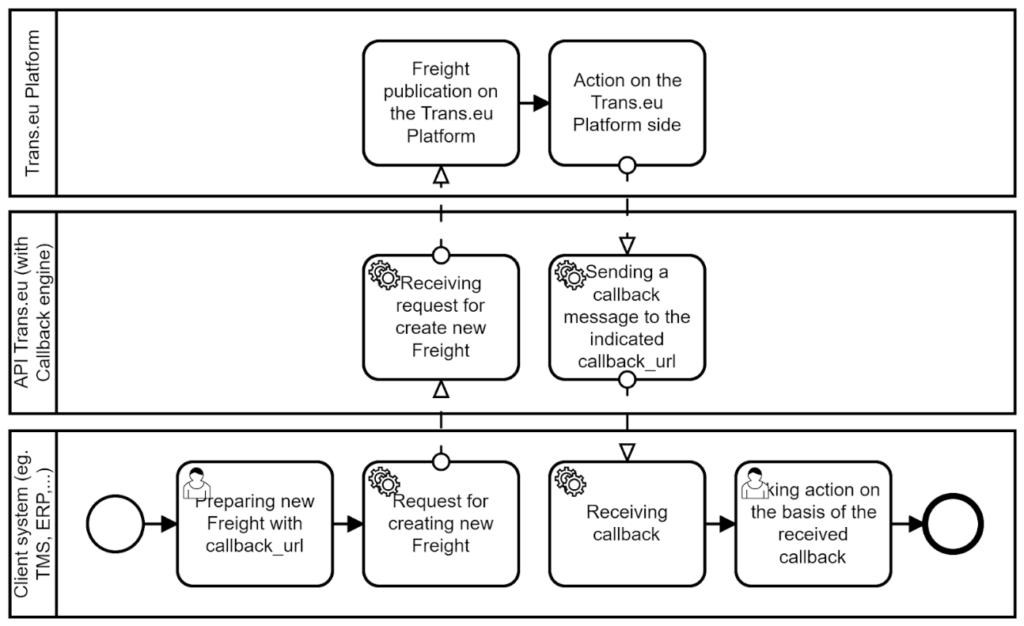
Callback URL is used to automatically receive notifications about events from Trans.eu Platform. When a specific event occurs, the Trans.eu system sends a request with event data to the callback URL you provided, allowing your application to react without constantly polling for updates. This solution can be used for objects created via API requests, such as freights, orders, announcements and time windows.
Clients should allow incoming callback requests from the IP address 52.208.90.151.
To receive notifications about events:
1. Provide the callback_url field in the request creating the object with a return address — callback address should start with protocol (http:// or https://)
"callback_url": "http://example.com/msg"2. Send the object via API with selected POST method request
Method: POST
Endpoint: /ext/freights-api/v1/freight-exchange
Endpoint: /ext/freights-api/v1/freight-employees
Endpoint: /ext/freights-api/v2/freights
Endpoint: /ext/freights-api/v1/freight-companies
Endpoint: /ext/freights-api/v1/freight-auto
Endpoint: /ext/freights-api/v1/private-exchange
Endpoint: /ext/freights-api/v1/freight-corporate
Endpoint: /ext/orders-api/v1/orders-created
Endpoint: /ext/dock-scheduler-api/v1/announcement
Endpoint: /ext/dock-scheduler-api/v1/warehouse/timeWindow
3. Listen for receive events at the address specified in callback_url — see the example response opposite
{
"id": "87795",
"event_name": "{freights.proposal_request.negotiated}",
"occurred_at": "2026-01-25T11:41:11+00:00",
"data": {
        "price": 560.20,
        "author": "12665-1"
      }
}
Callback flow
Structure of event
| Event field name | Event field type | Example | Event field description |
| id | Integer | “87795” | Freight id in freight events. Order id in order events. Time window id in Dock Scheduler events. |
| event_name | String | “{freights.proposal_request.negotiated}” | Event name given in brackets {} |
| occured_at | String (UTC timestamp with offset) | “2026–01-25T11:41:11+00:00” | Time of event occurrence |
| data | Object | Optional section with event-specific information. It is described in Data section column in the table below. |
List of freight events received to callback URL
| Event name | Description | Data section |
| freights.freight.create | Creating a new freight | |
| freights.freight.update | Freight data update | |
| freights_processing.publication.finished | End of freight publication. There may be a duplication with the event freights.publication.finished. | |
| freights_processing.publication.negotiation_time_finished | End of negotiation time for carrier | |
| freights.proposal_request.accepted | Acceptance of the freight offer by the negotiating participant, indicating the offered price. If the acceptance was made by the publisher or the publication included the “is_first_buy” option, the publication will be finished. | price (float type) — a price accepted during negotiation |
| freights.proposal_request.created | Start of a new negotiation. This event is always sent in parallel with the event of a new offer being made or an offer being accepted (with the “is_first_buy” publication option). | |
| freights.proposal_request.negotiated | Submission of a new price offer by a participant in the negotiations. | price (float type) — a new price offered in negotiationauthor_id (String type) — transId of the user submitting the offer |
| freights.proposal_request.negotiation_lost | Closing negotiations with the losing participant. Event sent for each losing participant. | id (Int type) — user’s company officeidauthor_id (String type) — transid of the negotiating userparticipant_company_id (Int type) — user’s company officeidfreight_id (Int type) — identification number of the negotiated freight |
| freights.proposal_request.rejected | A negotiation participant rejects the negotiation. Negotiations between these participants will not be able to be restarted. | |
| freights.proposal_request.renounced | A negotiation participant rejects the negotiation. Negotiations between these participants may be restarted. | |
| freights.proposal_request.withdrawn | Withdrawal of the submitted offer by a participant in the negotiations. | |
| freights.publication.accepted | Acceptance of the published freight by the carrier | |
| freights.publication.activated | Activation of freight publication | |
| freights.publication.canceled | Cancelling freight publication | |
| freights.publication.created | Creation of new publication | |
| freights.publication.finished | End of freight publication. There may be a duplication with the event freights_processing.publication.finished. |
List of order events received to callback URL
| Event name | Description | Data section |
| freight_orders.order.attachment_added | Adding an attachment to the order | |
| freight_orders.order.attachment_removed | Removing an attachment from the order | |
| freight_orders.order.attachment_visibility_changed | The visibility of the order attachment has changed | |
| freight_orders.order.created | Creating a new order (from freight) | |
| freight_orders.order.delivery_was_confirmed | Confirmation by the client of order delivery. | freight_id - freight id associated with the orderfreight_reference_number - automatically assigned business identifier of the freightshipment_external_id - external identification numberstatus - order status, always here “delivery-confirmed” |
| freight_orders.order.order_was_accepted_by_contract | Automatic acceptance of an order based on an fixed route | |
| freight_orders.order.order_was_cancelled | Canceling the order | |
| freight_orders.order.proposal_submitted | Proposal to change the terms of the order | |
| freight_orders.order.proposal_was_accepted | Acceptance of the terms of the order | |
| freight_orders.order.shipment_external_id_was_changed | The external shipment number has changed | |
| freight_orders.order.transports_was_finished | Confirmation by the carrier of unloading of all transports in the order | freight_id - freight id associated with the orderfreight_reference_number - automatically assigned business identifier of the freightshipment_external_id - external identification numberstatus - order status, always here “waiting-for-confirmation” |
| freight_orders.order.vehicle_and_driver_have_changed | Updating vehicle and driver data. Deprecated event, replaced by transports.transport.devices_set_changed event. |
List of Transports in realization events received to callback URL
| Event name | Description | Data section |
| transports.transport.devices_set_changed | Updating vehicle and driver data in a single transport within an order | carrier_id - Contractor’s office Idcarrier_name - Contractor’s nameexecutor_name - Driver’s name and surnameexecutor_phone - Driver’s phone numberfreight_id - freight id associated with the orderfreight_reference_number - automatically assigned business identifier of the freightorder_id - Order idorder_number - automatically assigned order numbersemitrailer_plate_number - trailer plate number, if occursshipment_external_id - external identification numbertruck_plate_number - truck plate number |
List of Dock Scheduler events received to callback URL
| Event name | Description | Data section |
| time_slot_management.announcement.created | Creation of announcement | |
| time_slot_management.announcement.deleted | Deletion of announcement | |
| time_slot_management.announcement.updated | Updating announcement data | |
| time_slot_management.time_window.created | Creating a time window | |
| time_slot_management.time_window.deleted | Deleting a time window | |
| time_slot_management.time_window.updated | Updating time window data |